
MPNITE Quotation Know-How Guide
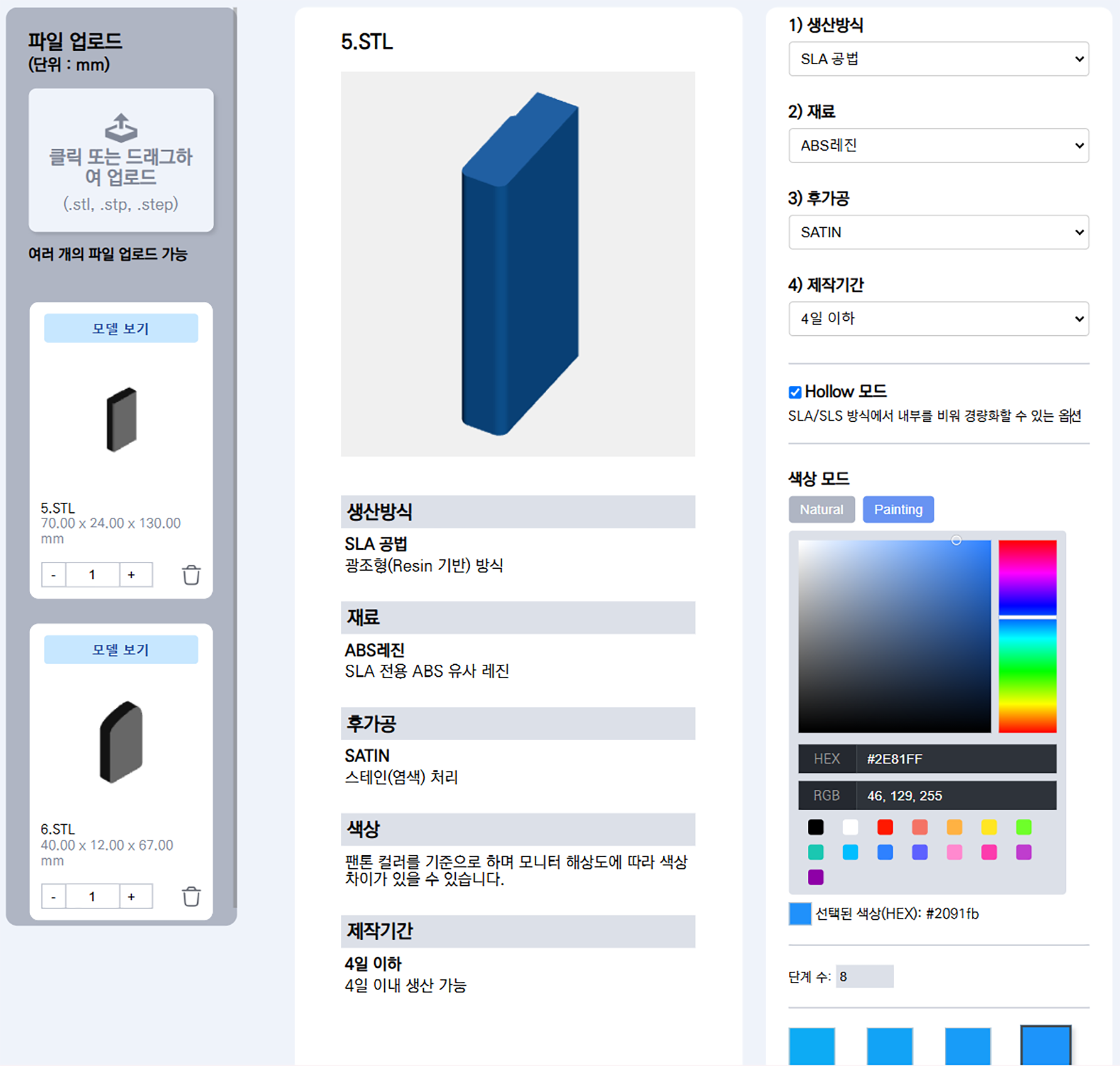
MPNITE offers not only single-color prints but also multi-color and material options for your 3D models. Upload your design, select the desired color, texture, and finish, and receive an instant quote with a live preview.
■ Note, The manufacturing process and materials are selected first. After that, the following post-processing (surface finishing) options are applied
1. Multi-color Options
- HEX or RGB color input
- Quick palette selection
- Natural Color & Painting Color mode available
2. Post-processing
Choose from different surface finishes such as Satin, Flat, or Polished, along with a wide range of materials, ensuring both aesthetic quality and durability for prototypes and final parts.
2-1.Post-processing Type
 |
 |
 |
 |
|---|---|---|---|
| FLAT | SATIN | SEMI GLOSS | GLOSS |
| Removal from printer ▶ Remove burrs ▶ Cleaning |
after FLAT ▶ Sand blast polishing ▶ Surface finishing |
after SATIN ▶ Putty ▶ Polishing ▶ Refining ▶ Painting |
after SEMI-GLOSS ▶ Painting ▶ Clear coat application |
3. Production Period
The longer the production period, the lower the cost.
MPNITE's quotation system directly impacts unit costs by adjusting the “Production Period.”
- Choosing Short lead times > Prioritizing equipment allocation may result in higher unit costs.
- Choosing Longer lead times > You can receive much lower unit prices by utilizing idle equipment.
4. Example Scenario
- Project characteristics : Simple structure, suitable for large-volume production (high quantity)
- Production lead time : Select the “31 days or more” option
- Result : Assign work to idle equipment > Improve equipment utilization rate > Enable production at very low cost
In short, MPNITE’s strength lies in the fact that “the less urgent the project, the more competitive the unit cost becomes.”
How to Get Started
Upload your 3D model, select your colors, and receive an instant quote today. From production to delivery, everything is handled seamlessly with MPNITE.
'How to use MPNITE' 카테고리의 다른 글
| Perfect Material Comparison with MPNITE CMF Kit (0) | 2025.09.04 |
|---|---|
| Easy 3D File Upload on MPNITE (0) | 2025.09.03 |
| PA6, PA66, PA11, PA12 나일론계 플라스틱의 세계 (0) | 2025.08.30 |
| MPNITE 3D Printing Design Guide (0) | 2025.08.26 |
| 엠피니티 3D 프린팅 디자인 가이드 (0) | 2025.08.22 |


